Website Optimisation for Google: A Practical Guide
Website optimisation for Google is the process of making your site easier for people to use and for search engines to discover, understand and present in search results. It brings together technical improvements, useful content and a clear, accessible user experience.
There is no guaranteed shortcut to higher rankings. Google’s systems consider many signals, and results can change over time. A sustainable approach focuses on helping visitors find trustworthy, relevant answers while ensuring your website works well.
Start with your visitors
Before changing your site, consider what your audience wants to achieve. Are they comparing services, looking for product details or trying to solve a particular problem? Researching customer questions, reviewing site searches and speaking with your sales or support teams can help you identify what your pages should cover.
Build each page around a clear purpose. Explain the subject in straightforward language, organise information with descriptive headings and make the next step obvious. Avoid creating pages solely to target individual search phrases if they do not offer distinct value to visitors.
Make your content useful and trustworthy
Google aims to surface helpful, relevant information. Publish original content that demonstrates genuine knowledge of your subject and answers the reader’s question. Give accurate details, use examples where they add value and keep important information up to date.
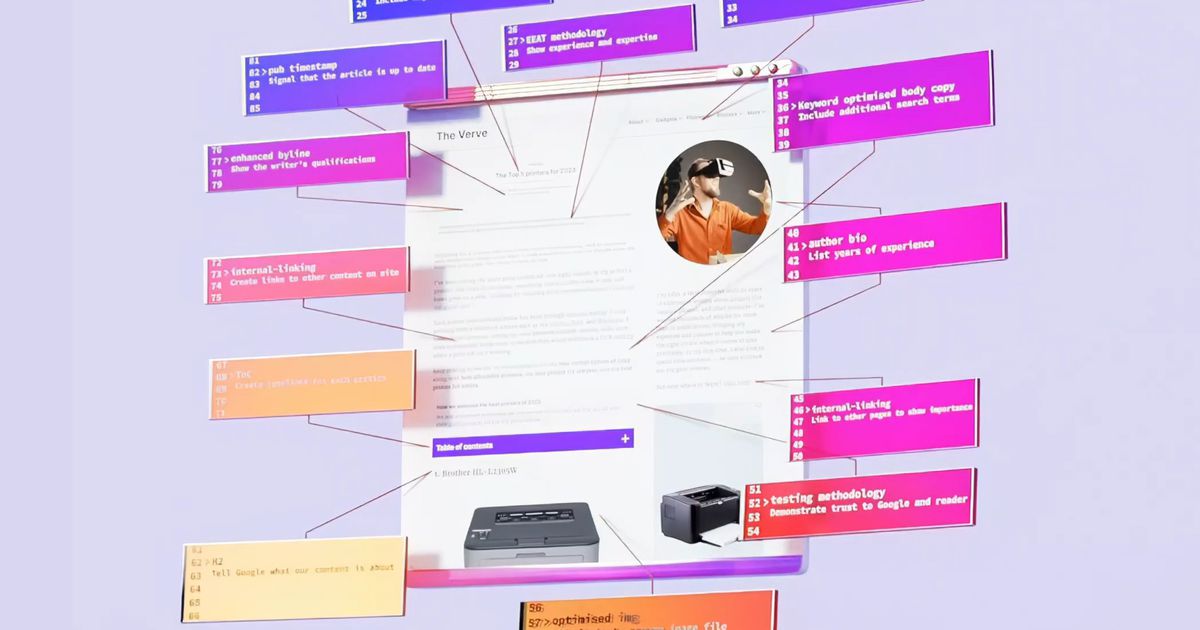
Write page titles and descriptions that accurately summarise the content. A clear title can help people understand what a page is about before they visit. A meta description may be used as the search-result snippet, although Google can choose different text from the page.
Use internal links to connect related pages. Link text should describe the destination, helping visitors navigate and giving search engines useful context. For images, use clear file names and alternative text where the image conveys information; decorative images can generally have empty alternative text.
Check the technical foundations
A technically sound website helps search engines access and interpret its pages. Make sure important pages can be crawled and indexed, and check that accidental blocks in your robots.txt file or “noindex” instructions are not preventing visibility. An XML sitemap can help search engines discover URLs, though submitting one does not guarantee that every page will be indexed.
Use a logical site structure and descriptive URLs. If you change a page address, set up an appropriate redirect so visitors and search engines can find the new location. Keep duplicate or very similar pages under control, using canonical tags where they are suitable.
Secure your site with HTTPS and fix broken links, server errors and redirect chains. These improvements support a more reliable experience and make it easier to maintain the site.
Improve speed and mobile usability
Many people browse on mobile devices, so pages should adapt to different screen sizes. Check that text is readable without zooming, buttons are easy to tap and important content is not hidden or difficult to reach.
Page performance matters to visitors. Compress and resize images, remove unnecessary scripts and choose reliable hosting. Google’s Core Web Vitals provide a way to assess loading performance, interactivity and visual stability. Tools such as PageSpeed Insights can identify possible improvements, but scores should be considered alongside real user experience rather than treated as a ranking guarantee.
Use Google’s tools to measure progress
Google Search Console can show how your site performs in Google Search, which queries bring impressions and clicks, and whether Google has identified indexing or page-experience issues. Google Analytics or another analytics platform can help you understand what visitors do after arriving. Set up measurement in line with applicable privacy and consent requirements.
Look for meaningful trends rather than reacting to every short-term fluctuation. Compare performance by page, topic and device, then prioritise changes that can improve the experience or address a clear technical problem.
Consider local search visibility
If your organisation serves customers in a particular area, keep your business name, address and phone number accurate and consistent across your website and relevant business listings. Create useful location information where it genuinely helps customers, and keep opening hours and service details current.
Optimise continuously
Website optimisation is ongoing. Review important pages regularly, update out-of-date information, test the site on different devices and monitor changes in search performance. Focus first on issues that affect visitors or prevent search engines from accessing valuable content.
By combining useful content, sound technical foundations and a straightforward user experience, you can make your website more accessible to Google and more valuable to the people you want to reach.
Top 6 Tips for Optimising Your Website for Google Search
- Use clear page titles and meta descriptions.
- Create helpful, original content for your audience.
- Make your site fast on mobile and desktop.
- Use descriptive URLs and headings.
- Add alt text to meaningful images.
- Check Google Search Console for issues and opportunities.
Use clear page titles and meta descriptions.
Use clear, descriptive page titles and meta descriptions to help people understand what each page offers before they visit. Keep titles concise and specific, and write a unique description that accurately summarises the page and its value. These details can make your search result more useful and encourage relevant clicks, although Google may sometimes generate its own title or description for display.
Create helpful, original content for your audience.
Create helpful, original content that answers your audience’s real questions and gives them a reason to visit your website. Share accurate information, practical advice and insights drawn from your experience, rather than simply rephrasing what is already available elsewhere. Organise each page clearly and keep it up to date, so visitors can quickly find what they need. Content that genuinely serves people can also help Google understand your pages and match them with relevant searches.
Make your site fast on mobile and desktop.
Make your site fast on both mobile and desktop to give visitors a smoother experience and help them find what they need without delay. Compress and resize images, reduce unnecessary scripts and use reliable hosting to improve loading times. Test key pages on different devices and connections, and use tools such as Google PageSpeed Insights to spot opportunities for improvement.
Use descriptive URLs and headings.
Use descriptive URLs and headings to make your website easier to navigate and understand. Keep URLs concise and relevant to the page, using clear words that reflect its content rather than strings of numbers or unnecessary characters. Organise each page with a clear main heading and informative subheadings so visitors can scan the content and find what they need. This structure also helps Google understand how the page is organised, although it does not guarantee higher rankings.
Add alt text to meaningful images.
Add descriptive alt text to images that convey useful information, such as product photos, diagrams or charts. Briefly explain what each image shows and, where relevant, how it relates to the page. This helps people using screen readers understand the content and gives Google additional context about the image. Keep alt text accurate and concise, and leave it empty for purely decorative images so assistive technology can skip them.
Check Google Search Console for issues and opportunities.
Check Google Search Console regularly to spot issues and opportunities affecting your website’s visibility in Google Search. Review indexing reports to find pages Google cannot access, and check the performance report to see which searches bring visitors to your site. These insights can help you identify pages that need attention, discover topics worth covering and make informed improvements to your content and technical set-up.