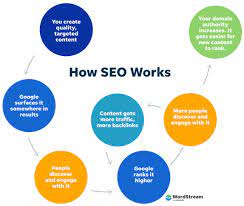
How to Optimise Search Results and Improve Your Online Visibility
When people search online for a product, service or answer, they often choose from the results they see first. Improving how your website appears in search results can help the right audience find your content. This process is known as search engine optimisation (SEO).
There is no guaranteed way to secure a particular ranking. Search engines consider many factors, and results can change over time. However, a useful, accessible website with clear information gives you a strong foundation.
Understand what your audience is searching for
Start by learning the words and questions your potential visitors use. Think about what they want to achieve, the problems they need to solve and the language they use to describe them. Search suggestions, customer enquiries and keyword research tools can all provide useful clues.
Choose a main topic for each page. A page that tries to cover several unrelated subjects can be difficult for both visitors and search engines to understand.
Create helpful, original content
Write for people first. Give clear, accurate answers and include the details a reader needs to take the next step. Useful content might explain a process, compare options, answer common questions or share practical experience.
- Use a clear page title that describes the content.
- Organise information with descriptive headings.
- Include relevant terms naturally, without repeating them excessively.
- Keep information accurate and update it when circumstances change.
- Avoid copying content from other websites.
Write clear page titles and descriptions
The page title can help people and search engines understand what a page is about. Make it specific and concise, and avoid using the same title across many pages. A meta description can summarise the page and encourage someone to visit, although search engines may choose to show different text from the page instead.
For example, a local bakery could use a title such as “Sourdough Bread in Bristol | Example Bakery” rather than a vague title such as “Welcome”.
Make your website easy to use
A good search experience does not end when someone clicks a result. Pages should load reliably, work well on mobile devices and be easy to navigate. Use readable text, descriptive links and clear menus. Compress large images where appropriate, and provide alternative text that describes meaningful images for people using assistive technology.
Use links thoughtfully
Internal links help visitors move between related pages and help search engines discover your site’s content. Use link text that explains where the link leads, rather than generic wording such as “click here”.
Links from relevant, reputable websites can also help people discover your pages. Focus on earning them through useful resources, quality service and genuine relationships. Avoid buying links or using schemes designed to manipulate rankings.
Help search engines discover your pages
Check that important pages can be accessed by search engines and are not accidentally blocked. A logical site structure, an XML sitemap and accurate redirects can support discovery and indexing. Search Console tools can help identify indexing issues and show how your site performs in Google Search.
Measure results and keep improving
Use analytics and search performance tools to monitor impressions, clicks, search queries and conversions. Look for patterns rather than reacting to every short-term change. If a page receives visits but does not help people complete an intended action, consider whether its content, layout or next steps need improvement.
Be patient and consistent
SEO is an ongoing process, not a one-off task. Improvements can take time to appear, and search results are influenced by competition, location, device and many other factors. Concentrate on making your website more useful, trustworthy and accessible, then review and refine your approach as you learn what works.
By understanding your audience, publishing helpful content and maintaining a technically sound website, you can improve the chances of your pages appearing for relevant searches—and give visitors a better experience when they find you.
5 Tips to Optimise Your Search Results
- Use specific keywords and phrases.
- Put the most important terms first.
- Use filters to narrow your search.
- Try synonyms if results are limited.
- Review and refine your query.
Use specific keywords and phrases.
Use specific keywords and phrases that reflect what your audience is actually searching for. Rather than targeting broad terms such as “shoes”, a retailer might use more precise phrases like “women’s waterproof walking boots”. Add relevant wording naturally to your page title, headings and content, while keeping the text clear and useful for readers. Avoid cramming in keywords: focused, informative content is more likely to meet people’s needs and attract relevant visitors.
Put the most important terms first.
Put the most important terms first in page titles, headings and key descriptions so readers can quickly understand what the content is about. This can also help search engines recognise the page’s main topic. Keep the wording natural and relevant, rather than cramming in keywords; clarity for your audience should always come first.
Use filters to narrow your search.
Use filters to narrow your search and find the most relevant results faster. Depending on the platform, you may be able to refine results by date, location, price, category or content type. Applying a few suitable filters can remove unrelated options and make it easier to focus on what you need. If the results become too limited, remove one or more filters and try again.
Try synonyms if results are limited.
If your search returns only a few useful results, try using synonyms or alternative phrases. Different websites may describe the same topic in different ways, so changing a word or rephrasing your query can uncover relevant information you might otherwise miss. For example, try “car” instead of “vehicle”, or “cost” instead of “price”.
Review and refine your query.
Review and refine your query to get more relevant search results. If your first search is too broad, add specific details such as a location, product type or date. Try alternative terms or remove words that may be limiting the results. Small changes can help you find more accurate information faster.