On-page optimisation: how to improve your website for search and visitors
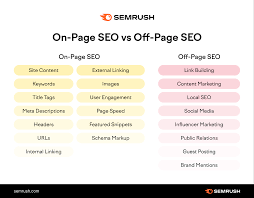
On-page optimisation is the process of improving individual web pages so that search engines and visitors can understand and use them more easily. It includes the content on a page as well as elements such as headings, title tags, internal links and images.
A well-optimised page is not simply packed with keywords. It answers a real question, presents information clearly and makes it straightforward for people to take the next step. These improvements can help search engines interpret a page and give visitors a better experience.
Start with the visitor’s needs
Before editing a page, consider what someone is looking for when they arrive. Are they seeking an explanation, comparing products or ready to make a purchase? The purpose of the page should match that need.
Research the language people use to search for the topic, then review the pages already appearing in search results. This can help you understand the questions and subtopics your page should address. Use relevant phrases naturally; avoid forcing keywords into sentences where they do not belong.
Write a clear title tag
The title tag is the page title that may appear as the clickable headline in search results and in a browser tab. Write a distinct, accurate title that describes the page and gives people a reason to choose it. Include the main topic where it fits naturally, and avoid repeating the same phrase unnecessarily.
Search engines may rewrite title links, so there is no guarantee that the title tag will be displayed exactly as written. Still, a concise and useful title gives them a strong indication of the page’s subject.
Create a helpful meta description
A meta description summarises a page and may be used as the snippet beneath its title in search results. It is not a direct ranking factor, and search engines can generate a different snippet based on a search. However, a clear description can help people decide whether the page is relevant to them.
Summarise the page accurately, mention its main benefit and use a natural call to action where appropriate. Give each important page its own description rather than copying the same text across the site.
Organise content with headings
Headings make content easier to scan and help establish its structure. Use one clear main heading, usually an h1, followed by descriptive subheadings such as h2 and h3 where needed.
Headings should describe the section that follows. They are not just a place to insert keywords, and they should be arranged in a sensible order. A clear structure helps visitors find the information they need, particularly when reading on a mobile device.
Make the content useful and easy to read
Strong page content is original, accurate and focused on the reader’s needs. Explain the subject fully enough to be useful, but do not add unnecessary paragraphs simply to make a page longer. Break up complex ideas, use examples where they help and keep sentences straightforward.
Check facts, update outdated information and make sure the page delivers on the promise made by its title. Where relevant, demonstrate experience and expertise, cite reliable sources and make it easy for visitors to learn who is responsible for the content.
Use descriptive URLs
A good URL is short, readable and relevant to the page. For example, example.co.uk/on-page-optimisation is clearer than a long address containing a string of numbers and parameters. Use hyphens to separate words and avoid changing established URLs without a good reason.
If a URL must change, set up an appropriate redirect from the old address to the new one. This helps visitors and search engines reach the correct page.
Add useful internal links
Internal links connect pages on the same website. They help visitors discover related information and help search engines find and understand other pages on the site.
Link to relevant pages using descriptive anchor text. For instance, “read our guide to technical SEO” tells readers more than “click here”. Make sure important pages can be reached through normal navigation or contextual links, rather than leaving them isolated.
Optimise images
Images can make a page more engaging, but large files may slow it down. Resize images to suit their display dimensions and use an appropriate file format. Compress files while keeping them clear enough for their purpose.
Write alternative text for images that convey useful information. Keep it concise and describe what matters in context. Decorative images can usually have empty alternative text so that screen readers can skip them. Use descriptive file names where practical, but avoid treating file names as a substitute for good page content.
Support a good page experience
Visitors should be able to use the page comfortably on different screen sizes. Check that text is readable, buttons and links are easy to use, and important content is not hidden behind intrusive pop-ups. Pages should load reliably and avoid sudden layout shifts where possible.
On-page optimisation is not a replacement for technical SEO. Issues such as crawling, indexing, site speed and mobile usability may need broader technical work, but they all affect how well a page performs for users and search engines.
Use structured data where it fits
Structured data is code that helps search engines interpret information on a page. Depending on the content and eligibility, it may support enhanced search result features. Use the relevant structured data type only when the page genuinely contains the information it describes, and follow current search engine guidelines. Structured data does not guarantee a richer search result or higher rankings.
A practical on-page optimisation checklist
- Does the page meet a clear visitor need?
- Does it have a unique, accurate title tag and meta description?
- Are headings descriptive and logically organised?
- Is the content helpful, current and easy to read?
- Does the URL clearly reflect the page topic?
- Are there useful internal links to related pages?
- Are images appropriately sized and accessible?
- Does the page work well on mobile devices?
- Are any claims or details in need of review?
Measure and improve over time
On-page optimisation is an ongoing task. Use analytics and search performance tools to monitor impressions, clicks, engagement and conversions. Look for pages that attract visitors but do not meet their needs, as well as useful pages that are difficult to discover.
Make changes based on evidence, then allow time to assess the results. Search performance can be affected by many factors, so avoid assuming that one edit will produce an immediate ranking change. Consistent attention to relevance, clarity and usability gives each page a stronger foundation.
Conclusion
Effective on-page optimisation brings together useful content, clear structure and thoughtful technical details. By focusing on what visitors need and making each page easy to understand, navigate and use, you can build a better experience while helping search engines interpret your website.
Essential FAQs on On-Page Optimisation: A Guide to Boosting Your SEO
- What is on-page optimisation in SEO?
- Why is on-page optimisation important?
- Which on-page SEO elements should I optimise first?
- How should I use keywords in page content?
- How do I write effective title tags and meta descriptions?
- How often should I update and optimise website content?
- How can I measure the results of on-page optimisation?
What is on-page optimisation in SEO?
On-page optimisation in SEO is the process of improving the content and elements on individual web pages to make them more useful for visitors and easier for search engines to understand. It can include refining page titles and headings, creating clear and relevant content, improving URLs and internal links, and optimising images. The aim is to help each page meet a visitor’s needs and communicate its topic clearly, rather than simply adding more keywords.
Why is on-page optimisation important?
On-page optimisation is important because it helps search engines understand what a page is about and whether it is relevant to a search, while making the content clearer and easier for visitors to use. Well-structured headings, helpful content, descriptive page titles and internal links can improve the user experience and help people find the information they need. Although it cannot guarantee higher rankings, on-page optimisation gives each page a stronger foundation for visibility and engagement.
Which on-page SEO elements should I optimise first?
Start with the elements that most clearly explain a page’s purpose and meet the visitor’s needs: make sure the content is useful and relevant to the search, then optimise the title tag and main heading so they describe the page accurately. Next, organise the content with clear subheadings, improve the URL where appropriate, and add relevant internal links and descriptive image alt text. Prioritise pages that matter most to your business, and avoid making changes just to add keywords—clarity and usefulness should come first.
How should I use keywords in page content?
Use keywords naturally in your page content, placing the main phrase where it clearly fits, such as in the title, main heading and relevant sections. Include related terms and answer the questions visitors are likely to have, but do not repeat keywords unnaturally or add them where they disrupt the meaning. Focus on making the page useful, clear and easy to read; relevance and helpful information matter more than keyword frequency.
How do I write effective title tags and meta descriptions?
Write a unique, descriptive title tag for each page that clearly summarises its content and includes the main topic naturally. Keep it concise and compelling, without repeating keywords or making claims the page cannot support. For the meta description, briefly explain what visitors will find and why it may be useful, using clear, natural language. While search engines may display different text in results, accurate titles and descriptions can help people decide whether your page is relevant.
How often should I update and optimise website content?
There is no fixed schedule for updating website content; review it regularly and make changes when information becomes outdated, your services or products change, or search performance shows that a page could be more useful. For important pages, a review every few months can help you spot inaccuracies, missing details and new questions from visitors. Avoid changing content just for the sake of it: keep what works, make updates that genuinely improve accuracy or usefulness, and check the results over time.
How can I measure the results of on-page optimisation?
Measure the results of on-page optimisation by tracking organic clicks, impressions, rankings and click-through rates in Google Search Console, alongside engagement and conversions in your analytics tool. Compare performance before and after changes, allowing time for search engines to recrawl and reassess the page. Look at relevant trends rather than relying on a single metric: stronger results may include more qualified visits, longer engagement or more enquiries and sales, not just higher rankings.