Moz Local SEO: A Practical Guide for Local Businesses
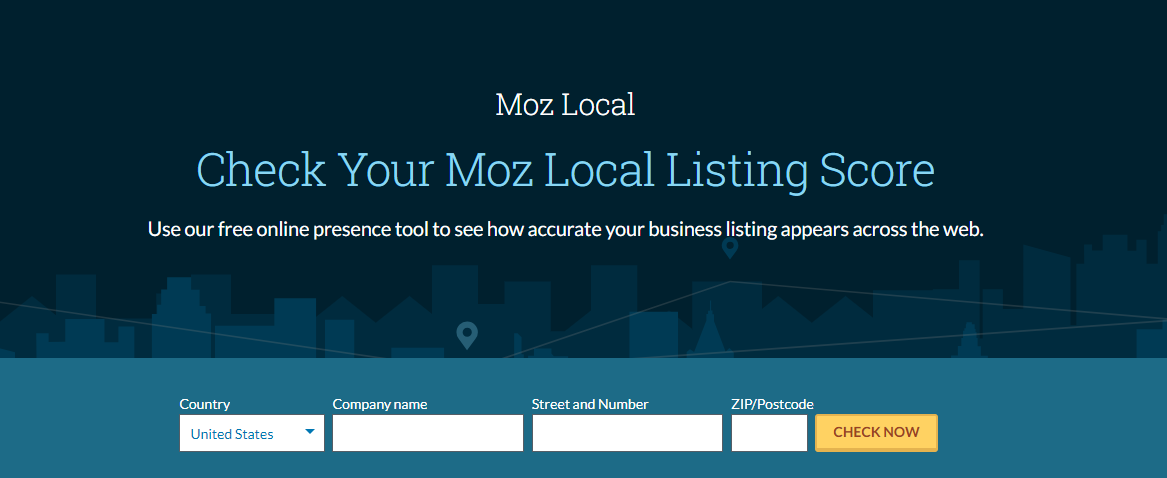
For businesses that serve customers in a particular town, city or region, appearing in local search results can make a real difference. A complete Google Business Profile, consistent contact details and accurate business listings all help potential customers find and trust a business. Moz Local is a tool designed to help businesses manage some of these local SEO tasks.
This guide explains what Moz Local does, how it can support a local search strategy and what to consider before using it.
What is Moz Local?
Moz Local is a local listing management tool from Moz. It helps businesses manage information such as their name, address, phone number, website and opening hours across selected online directories and platforms. Depending on the plan, location and available integrations, the tool may also provide features for monitoring listings, managing reviews and tracking local visibility.
The aim is to make it easier to keep business details accurate and consistent online. This matters because customers rely on listings to find businesses, while search engines use information from across the web to understand and verify local businesses.
Why local listings matter for SEO
Local SEO is the process of improving a business’s visibility in location-based search results. A person searching for a service nearby may see map results, local business profiles, directory listings and organic website results.
Accurate listings can support this visibility in several ways:
- They help customers find you. Correct addresses, phone numbers and opening hours reduce the risk of missed visits or calls.
- They build confidence. Consistent information across reputable platforms makes a business look more reliable.
- They help search engines understand your business. Matching details across sources can help confirm that listings refer to the same organisation.
- They improve the customer experience. Up-to-date details are particularly important when hours, services or locations change.
Listings are only one part of local SEO. A well-maintained website, useful local content, customer reviews and a complete Google Business Profile also play important roles.
How Moz Local can help
Managing business information
When a business operates across several directories, updating each listing individually can take time. Moz Local is intended to provide a central place to manage key business details and, where supported, distribute or update information across connected platforms.
Before making changes, check that the business name, address and phone number are correct. Use the same official details consistently, while following each platform’s rules. Avoid adding extra keywords to a business name unless they are genuinely part of its real-world name.
Finding and addressing listing issues
Businesses may have duplicate, incomplete or outdated listings, particularly if they have moved, changed phone numbers or been operating for many years. Listing management tools can help identify some of these issues and organise the work needed to correct them.
Not every platform will update at the same speed, and some listings may require manual verification or direct contact with the directory. Treat automated updates as a useful aid rather than a guarantee that every listing has been fixed.
Monitoring reviews
Some Moz Local plans and features may include review monitoring or related reputation tools. Review management can help businesses keep track of customer feedback and respond promptly. A thoughtful response should be polite, specific and professional, whether the review is positive or negative.
Reviews should be earned honestly. Do not buy reviews, offer rewards in exchange for positive ratings or pressure customers to change genuine feedback.
Tracking local performance
Local SEO tools may offer reporting that helps businesses monitor listing health or visibility. These reports can be useful for spotting trends, but they should be considered alongside meaningful business outcomes, such as phone enquiries, direction requests, bookings and sales.
How to use Moz Local effectively
- Confirm your core business details. Decide on the official business name, address, phone number, website URL, categories and opening hours.
- Check your Google Business Profile. Make sure the profile is claimed, verified where required and complete. Moz Local does not replace the need to manage Google Business Profile directly.
- Review existing listings. Look for duplicates, incorrect details and listings for old locations or phone numbers.
- Correct information carefully. Make changes that reflect the real business and comply with the guidelines of each platform.
- Keep details updated. Review listings whenever opening hours, services, contact details or locations change.
- Respond to customer feedback. Make review management part of a broader customer-service process.
- Measure results over time. Compare local visibility and listing activity with website visits, enquiries and conversions.
Moz Local and Google Business Profile
Moz Local and Google Business Profile serve different purposes. Google Business Profile is Google’s own platform for managing how an eligible business appears across Google Search and Maps. Moz Local is a separate tool that can help manage business information across selected listing sites and provide local SEO-related features.
Using a listing management tool does not remove the need to claim and maintain a Google Business Profile. Businesses should also check that any changes made through third-party tools are reflected correctly on important platforms.
Is Moz Local right for your business?
Moz Local may be useful for businesses that need to manage listings across multiple locations or directories, especially when keeping information consistent manually is becoming difficult. It may also help teams organise listing maintenance and monitor certain local SEO signals.
It may be less essential for a small business with one location and only a handful of listings that can be managed directly. In that case, the value depends on the time saved, the features available and the cost of the plan.
Features, supported platforms and pricing can change, and availability may vary by country. Check Moz’s current product information before choosing a plan. It is also worth comparing the service with other listing management tools and considering which directories matter most to your customers.
Common mistakes to avoid
- Expecting listings alone to improve rankings. Local SEO also depends on relevance, prominence, the website and the quality of the customer experience.
- Using inconsistent business details. Small differences can confuse customers and make listings harder to maintain.
- Creating unnecessary listings. Focus on reputable, relevant platforms rather than submitting business details everywhere.
- Ignoring duplicate profiles. Duplicates can confuse customers and divide engagement between listings.
- Forgetting to update changes. Seasonal hours, relocations and new contact details should be reflected promptly.
- Relying only on software. Automated tools can assist with administration, but listings still need human review.
Final thoughts
Moz Local can support local SEO by helping businesses organise and maintain information across selected online listings. Its value depends on the business’s location, number of sites, existing listing problems and the features available in the chosen plan.
For the best results, use listing management as part of a broader local SEO strategy. Keep your website useful and accurate, maintain your Google Business Profile, earn genuine customer reviews and make it easy for local customers to contact or visit your business.
Moz Local SEO: 14 Frequently Asked Questions Answered
- What does Moz local do?
- How do I optimize local SEO?
- Is Moz good for SEO?
- What is moz local?
- What is the best local SEO factor?
- Is local SEO profitable?
- What is a local SEO?
- What does Moz do for SEO?
- What is localized SEO?
- How to do local SEO in 2022?
- What is moz tool in SEO?
- What are the three pillars of local SEO?
- Is Moz SEO good?
- How do I do local listings in SEO?
What does Moz local do?
Moz Local helps businesses manage their local business information across selected online directories and platforms. It can make it easier to keep details such as your business name, address, phone number and opening hours accurate and consistent, and may also offer tools for monitoring listings, reviews and local visibility. It supports local SEO, but does not replace maintaining your Google Business Profile or creating a useful, well-optimised website.
How do I optimize local SEO?
To optimise local SEO, make sure your Google Business Profile is claimed, verified and complete, with accurate contact details, opening hours, categories and services. Keep your business name, address and phone number consistent across your website and reputable online directories; a tool such as Moz Local can help you manage these listings. Create useful, location-specific website content, ensure your site works well on mobile, and invite customers to leave honest reviews—responding to feedback professionally. Track local enquiries and visibility regularly, and update your details whenever your business information changes.
Is Moz good for SEO?
Yes, Moz can be a useful tool for SEO. Its products offer features such as keyword research, site audits, link analysis and local listing management, which can help businesses plan and monitor their work. However, Moz does not improve rankings by itself, and its data should be treated as guidance rather than a guarantee. Whether it is a good choice depends on your goals, budget and the features you need; it works best alongside a well-maintained website, useful content and a consistent SEO strategy.
What is moz local?
Moz Local is a local listing management tool from Moz that helps businesses manage and monitor key details—such as their name, address, phone number and opening hours—across selected online directories and platforms. It can make it easier to keep business information accurate and consistent, helping customers find the right details and supporting a wider local SEO strategy. It does not replace managing your Google Business Profile or maintaining a useful, up-to-date website.
What is the best local SEO factor?
There is no single “best” local SEO factor, as local visibility depends on several signals working together. However, a complete and accurate Google Business Profile is a strong foundation: choose the right categories, keep your contact details and opening hours up to date, add relevant information and respond to customer reviews. Your website’s relevance, proximity to the searcher and reputation also matter, so focus on giving local customers clear, trustworthy information wherever they find your business.
Is local SEO profitable?
Local SEO can be profitable when it helps a business reach nearby customers who are actively searching for its products or services. Better visibility in local search results may lead to more calls, visits, bookings and sales, but results depend on factors such as competition, demand, location and the quality of your website and customer experience. To assess its profitability, track enquiries and conversions from local search and compare their value with the time and cost invested in your SEO efforts.
What is a local SEO?
Local SEO is the process of improving a business’s visibility in search results for location-based queries, such as “plumber near me” or “café in Manchester”. It helps nearby customers find relevant businesses through Google Search, Maps and other online platforms. Local SEO typically involves keeping business details accurate across listings, managing a Google Business Profile, earning genuine customer reviews and creating useful content for the areas a business serves.
What does Moz do for SEO?
Moz provides SEO tools and resources to help businesses understand and improve their visibility in search results. For local SEO, Moz Local can help manage business listings across selected directories, check for inconsistent or incomplete details, and monitor aspects of local visibility and customer reviews, depending on the plan and available features. It supports this work but does not guarantee higher rankings: businesses still need accurate website content, a well-maintained Google Business Profile and a strong overall local SEO strategy.
What is localized SEO?
Localised SEO is the process of improving a business’s visibility in search results for people looking for products or services in a specific area. It involves using accurate business details, maintaining a complete Google Business Profile, earning genuine customer reviews and creating useful content relevant to local customers. For example, a plumber might optimise their website and listings to appear when people search for plumbing services in their town.
How to do local SEO in 2022?
To do local SEO in 2022, start by claiming and completing your Google Business Profile, making sure your business name, address, phone number, opening hours and categories are accurate. Keep these details consistent across your website and reputable online directories, and create helpful pages or content that reflect the areas you serve. Encourage genuine customer reviews and respond to them professionally, improve your website’s mobile experience and make contact details easy to find. Tools such as Moz Local can help you monitor and manage listings, but local SEO works best as an ongoing effort, with regular updates and attention to enquiries, visits and other meaningful results.
What is moz tool in SEO?
Moz is an SEO software platform that offers tools for researching keywords, analysing backlinks, checking website performance and tracking search rankings. For local SEO, Moz Local helps businesses manage and monitor their business listings across selected online directories, making it easier to keep details such as addresses, phone numbers and opening hours accurate and consistent. These tools can support an SEO strategy, but they do not replace useful website content, a well-maintained Google Business Profile or good customer service.
What are the three pillars of local SEO?
The three pillars of local SEO are relevance, distance and prominence. Relevance is how well a business profile and website match what someone is searching for; distance is how close the business is to the searcher or the location specified; and prominence is how well-known and trusted the business appears, based on signals such as reviews, links and mentions across the web. Tools such as Moz Local can help keep business listings accurate and consistent, supporting the wider local SEO effort.
Is Moz SEO good?
Moz is a reputable SEO platform that can be useful for keyword research, site audits, rank tracking and link analysis, while Moz Local can help businesses manage local listings. Whether it is a good fit depends on your needs, budget and the features you’ll actually use; it won’t improve rankings by itself. Like any SEO tool, it works best when its insights guide a consistent strategy focused on useful content, a technically sound website and accurate local business information.
How do I do local listings in SEO?
To build local listings for SEO, claim and complete your Google Business Profile, then add your business to relevant, reputable directories and local platforms. Keep your business name, address, phone number, website, opening hours and services accurate and consistent across every listing. Choose suitable categories, add useful photos and respond to customer reviews. Check listings regularly for outdated details or duplicates, especially after a change of address or opening hours.