Google Maps SEO Optimisation: A Practical Guide for Local Businesses
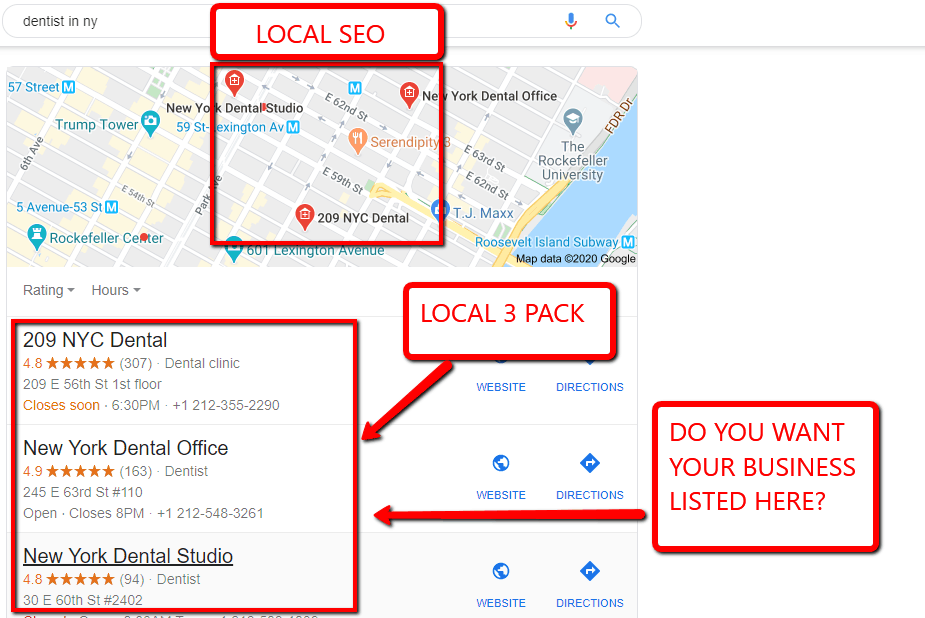
When people search for a nearby service, shop or place to eat, Google Maps can help them find local businesses quickly. Appearing prominently in Maps may increase your visibility among people who are ready to visit, call or make an enquiry. Improving that visibility is often called Google Maps SEO or local SEO.
There is no guaranteed way to reach the top of Google Maps. However, businesses can improve their chances by keeping their information accurate, building trust and making it easy for Google and potential customers to understand what they offer.
How Google Maps rankings work
Google says local results are mainly influenced by three factors:
- Relevance: How well a business profile matches what someone is searching for.
- Distance: How far the business is from the searcher or the location included in the search.
- Prominence: How well-known and established the business appears, based on signals such as reviews, links and information across the web.
Distance is not something a business can directly optimise. The most practical areas to work on are relevance and prominence, while ensuring that the business profile gives customers clear, accurate information.
Set up and verify your Google Business Profile
Google Maps listings are managed through a Google Business Profile. Claim or create the profile for your business, then complete Google’s verification process. Verification helps establish that the business is eligible to manage its listing.
Make sure the profile reflects the business as it exists in the real world. Use the correct business name, address or service area, telephone number, website and opening hours. Avoid adding extra keywords to the business name unless they are genuinely part of the name used in the business’s branding and signage.
Choose the most accurate categories
Your primary category is an important way to describe what your business does. Select the closest available category for your main service, then add relevant additional categories where appropriate. Avoid choosing categories simply because they seem popular: they should accurately represent services customers can actually get from the business.
Review your categories periodically. If the business changes its main offering, the profile should change with it.
Complete the profile in detail
A complete profile helps customers decide whether your business meets their needs. Add a clear description, services or products, opening hours, contact details and other relevant information. Upload genuine, high-quality photos of the premises, team, products or work. Keep images current and representative of the business.
Use the profile’s features where they suit your business, such as appointment links, menus, booking options or messaging. Check the listing regularly to make sure details remain correct, particularly after changes to hours or services.
Keep business information consistent
Google and customers should be able to find consistent details about your business across the web. Check that the business name, address and telephone number are correct on your website, directories, social media profiles and industry listings. This is often referred to as NAP consistency: name, address and phone number.
Consistency does not mean creating a large number of low-quality directory listings. Prioritise reputable directories and organisations relevant to your location or industry, and correct outdated information when you find it.
Earn genuine customer reviews
Reviews can help potential customers understand what to expect and may contribute to a business’s prominence. Invite customers to leave honest feedback after a genuine experience. Make it easy by sharing a direct review link, but do not offer gifts, discounts or other incentives in exchange for reviews.
Respond politely to reviews, including critical ones. A useful reply acknowledges the customer’s comments and, where needed, offers a way to resolve the issue privately. Do not disclose personal or confidential information in public responses.
Build useful local pages on your website
Your website can reinforce the information in your Business Profile. Create clear pages for your services and the areas you genuinely serve. Each page should provide useful, original information, such as service details, local availability, pricing guidance or answers to common questions.
Avoid creating many near-identical pages that only swap one town name for another. Such pages offer little value to visitors. If your business has a physical location, make its address and contact details easy to find. If it serves customers at their locations, explain the service area clearly without implying that the business has premises where it does not.
Make your website easy to use on mobile
Many local searches happen on mobile devices. Ensure your site loads reliably, works on smaller screens and makes key information easy to access. Prominent contact details, clear service descriptions and a simple route to book or enquire can make a practical difference to visitors.
Where appropriate, use structured data such as LocalBusiness schema to describe information on your website. Structured data can help search engines interpret a page, but it does not guarantee a particular ranking or special search result. The information in the markup must match what visitors can see on the page.
Publish relevant updates and answer questions
Use Google Business Profile posts or updates when they provide timely information, such as a new service, event or change to opening hours. Keep content accurate and useful rather than publishing simply to add keywords. Check for customer questions and provide clear answers where the profile allows it.
Measure results and keep improving
Use Business Profile performance data and website analytics to understand how people find and interact with your business. Depending on the reporting available, you may be able to review profile views, searches, calls, website visits, direction requests or other actions.
Track meaningful outcomes as well as visibility. For example, monitor calls, bookings and enquiries, not just the position of a listing for one search. Local results can vary according to the searcher’s location, query and other factors, so a single ranking check does not tell the whole story.
Common Google Maps SEO mistakes to avoid
- Adding keywords or location names to a business name when they are not part of its real-world name.
- Using an incorrect address, misleading service area or virtual office that does not meet Google’s eligibility requirements.
- Selecting irrelevant categories or listing services the business does not provide.
- Buying reviews, offering incentives for reviews or asking only satisfied customers to leave feedback.
- Creating duplicate profiles for the same business location.
- Publishing thin, repetitive location pages with little value for customers.
- Leaving outdated opening hours, contact details or service information online.
A steady approach to local visibility
Google Maps SEO is not a one-off task. Strong local visibility comes from accurate business information, a complete and useful profile, genuine customer feedback and a website that clearly explains what the business offers. Review these elements regularly, follow Google’s guidelines and focus on helping local customers make an informed choice.
Google Maps SEO Optimisation: 24 Frequently Asked Questions
- Does SEO work on Google Maps?
- How do I get noticed on Google Maps?
- How do I find my Google Maps ranking?
- How to make money with Google Maps 100-200 per day?
- Does Google Maps help with SEO?
- How do I improve the quality of Google Maps?
- How do I get better rankings on Google Maps?
- Is Google Maps good for SEO?
- Can you optimize Google Maps?
- How do I increase visibility on Google Maps?
- What is the 80/20 rule in SEO?
- How do you rank a map?
- Does embedding a Google Map help SEO?
- How do I increase my rank on Google Map?
- How do I maximize Google SEO?
- How do I optimize a route in Google Maps?
- Can ChatGPT do SEO?
- How do I improve SEO on Google Maps?
- How do I rank higher on Google Maps 2023?
- Is SEO still worth it in 2026?
- How do you rank 1 on Google Maps?
- What is map optimization?
- How do I improve Google Maps SEO?
- How do I improve my Google Maps SEO?
Does SEO work on Google Maps?
Yes. SEO can help your business appear more prominently in Google Maps results by improving the relevance and prominence of your Google Business Profile and website. Complete your profile accurately, choose suitable categories, keep your business details consistent online, and encourage genuine customer reviews. However, Google Maps rankings also depend on the searcher’s location and other factors, so no SEO strategy can guarantee a particular position.
How do I get noticed on Google Maps?
To get noticed on Google Maps, claim and verify your Google Business Profile, then keep your business name, address or service area, phone number, opening hours and website accurate and up to date. Choose the most relevant business category, add clear descriptions, services and genuine photos, and invite customers to leave honest reviews—responding to them professionally. Make sure your website and reputable local directories show consistent business details. These steps can improve your visibility, although Google Maps rankings also depend on factors such as relevance, distance and prominence, so no position can be guaranteed.
How do I find my Google Maps ranking?
To check your Google Maps ranking, search for your main services and location in Google Maps and note where your business appears. For a more reliable view, check from different locations and devices, as results can vary according to the searcher’s location and search terms. You can also use Google Business Profile performance data to see how people find and interact with your listing. Local rank-tracking tools can help monitor visibility across several areas, but treat their results as estimates rather than a fixed position.
How to make money with Google Maps 100-200 per day?
Google Maps does not pay users for appearing in search results, and earning £100–£200 a day is not guaranteed. Businesses may generate that level of income by using Google Maps to attract local customers, or by offering legitimate services such as Google Business Profile management and local SEO to clients. Focus on accurate listings, useful business information, genuine customer reviews and clear ways to enquire or book; follow Google’s guidelines and avoid fake reviews, misleading listings or promises of guaranteed rankings.
Does Google Maps help with SEO?
Yes, Google Maps can support your local SEO by helping nearby customers discover your business in local search results. A well-maintained Google Business Profile—with accurate contact details, relevant categories, current opening hours, photos and genuine customer reviews—can improve your visibility and encourage calls, visits and website enquiries. It is not a substitute for a well-optimised website, and appearing on Maps is not guaranteed, but it can be an important part of a broader local SEO strategy.
How do I improve the quality of Google Maps?
If you mean improving the quality of your business listing on Google Maps, keep your Google Business Profile accurate and complete. Use the correct business name and category, update your address or service area, opening hours and contact details, and add clear photos and a helpful description of your services. Encourage genuine customer reviews and respond to them professionally, and make sure your business information is consistent on your website and other reputable directories. Avoid adding misleading details or keywords to your business name, as this can damage trust and may breach Google’s guidelines.
How do I get better rankings on Google Maps?
To improve your Google Maps rankings, claim and verify your Google Business Profile, then keep your business details accurate and complete. Choose the most relevant categories, add clear information about your services, and upload genuine photos. Encourage customers to leave honest reviews and respond to them professionally. Make sure your name, address and phone number are consistent across your website and reputable directories, and create useful website content about the services and areas you genuinely serve. Google Maps results also depend on distance and prominence, so rankings can vary by searcher and location; no optimisation can guarantee a particular position.
Is Google Maps good for SEO?
Yes. Google Maps can support local SEO by helping your business appear when people search for nearby services or places. A well-maintained Google Business Profile can make it easier for potential customers to find key details, read reviews, request directions or contact you. It is not a substitute for a useful website or a guarantee of higher rankings, but accurate business information, relevant categories and genuine customer reviews can strengthen your local online presence.
Can you optimize Google Maps?
Yes. Google Maps itself cannot be changed, but your Google Business Profile and local online presence can be optimised to improve your chances of appearing in relevant local searches. This includes verifying and completing your profile, choosing accurate categories, keeping your business details and opening hours up to date, adding genuine photos, earning authentic customer reviews and maintaining consistent information across your website and trusted directories. These steps can strengthen your local visibility, although rankings are not guaranteed and also depend on factors such as relevance, distance and prominence.
How do I increase visibility on Google Maps?
To increase your visibility on Google Maps, claim and verify your Google Business Profile, then make sure its business name, address or service area, phone number, opening hours and website are accurate and complete. Choose the most relevant categories, describe your services clearly, add genuine photos and keep the profile up to date. Encourage customers to leave honest reviews and respond to them professionally. Consistent business details across your website and reputable directories, alongside useful pages about your services and the areas you serve, can also strengthen your local presence. Google considers relevance, distance and prominence, so rankings can vary by searcher location and cannot be guaranteed.
What is the 80/20 rule in SEO?
The 80/20 rule in SEO is the idea that a relatively small share of your efforts may produce most of your results—for example, a few key service pages, accurate Google Business Profile details or strong customer reviews may drive much of your local visibility. It is a useful way to prioritise work, not a guaranteed formula: which actions matter most will vary by business, competition and location. For Google Maps SEO, focus first on the essentials, such as choosing accurate categories, completing your profile and earning genuine reviews, then measure what brings relevant calls, visits and enquiries.
How do you rank a map?
To improve your Google Maps ranking, claim and verify your Google Business Profile, then keep your business details accurate and complete. Choose the most relevant categories, describe your services clearly, add genuine photos and encourage customers to leave honest reviews. Make sure your website and trusted local listings show consistent business information, and respond helpfully to reviews. Google Maps rankings depend on relevance, distance and prominence, so you can strengthen your profile and reputation, but you cannot control a searcher’s distance or guarantee a particular position.
Does embedding a Google Map help SEO?
Embedding a Google Map on your website can make it easier for visitors to find your premises, but it is not, by itself, a guaranteed way to improve Google Maps rankings. Its main benefit is helping customers with directions and reinforcing useful location information. For stronger local SEO, make sure your address and contact details are accurate and consistent across your website and Google Business Profile, and provide helpful, locally relevant content.
How do I increase my rank on Google Map?
To improve your ranking on Google Maps, complete and verify your Google Business Profile, choose the most accurate business categories, and keep your contact details, opening hours and services up to date. Encourage genuine customer reviews and respond to them professionally, while ensuring your website and trusted local listings show consistent business information. Google considers relevance, distance and prominence, so rankings can vary by searcher location and cannot be guaranteed.
How do I maximize Google SEO?
To maximise your Google SEO, focus on making your business easy to understand, trust and find. Keep your Google Business Profile complete and accurate, choose relevant categories, add up-to-date photos and services, and encourage genuine customer reviews. Make sure your website is helpful, mobile-friendly and clearly explains what you offer and where you operate. Keep your business details consistent across reputable websites, and review performance regularly so you can improve what is working. No tactic can guarantee a top ranking, but consistent, customer-focused optimisation can strengthen your visibility in Google Search and Maps.
How do I optimize a route in Google Maps?
To optimise a route in Google Maps, enter your starting point and destination, then add any extra stops and arrange them in the order that makes sense for your journey. Google Maps can suggest routes based on current traffic and travel conditions, but it may not automatically find the most efficient order for several stops, so you may need to rearrange them and compare the alternatives. For frequent or complex multi-stop journeys, consider using a route-planning tool designed to optimise stop order, then check the final route in Google Maps before setting off.
Can ChatGPT do SEO?
Yes, ChatGPT can help with SEO by researching topics, drafting website copy, suggesting page titles and meta descriptions, and creating ideas for local content or Google Business Profile updates. It can support Google Maps SEO by helping you describe your services clearly and plan responses to common customer questions, but it cannot guarantee rankings or replace accurate business information, genuine reviews and sound local SEO strategy. Always check its suggestions for accuracy, usefulness and compliance with Google’s guidelines before publishing.
How do I improve SEO on Google Maps?
To improve your SEO on Google Maps, claim and verify your Google Business Profile, then keep its business name, address or service area, phone number, opening hours and website accurate and up to date. Choose the most relevant business categories, add clear information about your services, and upload genuine photos. Encourage customers to leave honest reviews and respond professionally to feedback. Make sure your website and reputable local directories show consistent business details, and create useful pages about the services and areas you genuinely cover. These steps can strengthen your local presence, although Google Maps rankings also depend on factors such as the searcher’s location and the relevance and prominence of your business.
How do I rank higher on Google Maps 2023?
To improve your Google Maps ranking in 2023, claim and verify your Google Business Profile, then complete it with accurate contact details, opening hours, relevant categories, services and photos. Encourage genuine customer reviews and respond to them professionally, keep your business information consistent across your website and reputable directories, and create useful website content about your services and the areas you serve. Avoid keyword-stuffing your business name or buying reviews. Google Maps results also depend on the searcher’s location, so no optimisation can guarantee a top position.
Is SEO still worth it in 2026?
Yes, SEO is still worth it in 2026, particularly for local businesses aiming to reach customers through Google Search and Google Maps. Although search continues to evolve, accurate business information, relevant website content and genuine customer reviews remain important foundations for local visibility. Google Maps SEO can help people discover your services when they are looking for nearby options, potentially generating calls, visits and enquiries. However, results depend on factors such as competition, location and the quality of your website and Google Business Profile. The best way to judge its value is to measure qualified leads, bookings and revenue rather than rankings alone.
How do you rank 1 on Google Maps?
There’s no guaranteed way to rank number one on Google Maps, as results vary according to the searcher’s location and query. To improve your visibility, verify and complete your Google Business Profile, choose accurate categories, keep your business details consistent, and make sure your website clearly describes your services and locations. Encourage genuine customer reviews and respond to them professionally. Google considers relevance, distance and prominence, so focus on accurate information and a trustworthy local presence rather than shortcuts or keyword-stuffing your business name.
What is map optimization?
Map optimisation is the process of improving a business’s visibility in Google Maps and local search results. It involves creating and maintaining an accurate Google Business Profile, choosing relevant categories, adding up-to-date details and photos, earning genuine customer reviews, and keeping business information consistent across the web. The aim is to help nearby customers find and choose your business.
How do I improve Google Maps SEO?
To improve your Google Maps SEO, claim and verify your Google Business Profile, then keep your business name, address or service area, phone number, opening hours and website accurate and up to date. Choose the most relevant business categories, add clear details about your services, and upload genuine photos. Encourage customers to leave honest reviews and respond to them professionally. Make sure your website clearly describes your services and the areas you serve, and keep your business details consistent across reputable online directories. Follow Google’s guidelines and review your profile’s performance regularly; these steps can strengthen your local visibility, though they cannot guarantee a particular ranking.
How do I improve my Google Maps SEO?
Improve your Google Maps SEO by claiming and verifying your Google Business Profile, then keeping your business name, address or service area, phone number and opening hours accurate and consistent online. Choose the most relevant categories, add detailed information about your services, and upload genuine, up-to-date photos. Encourage customers to leave honest reviews and respond professionally to their feedback. You can also strengthen your local presence with helpful, locally relevant content on your website and reputable directory listings. There is no guaranteed shortcut to a higher ranking, so keep your information current and measure calls, visits and enquiries as well as visibility.