Google Analytics and Digital Marketing: How to Turn Data into Better Decisions
Digital marketing generates a wealth of information: website visits, product views, form submissions, purchases and more. Google Analytics helps businesses make sense of this activity by showing how people find and use their websites. Used thoughtfully, it can help marketers understand what is working, identify opportunities and make more informed decisions about their campaigns.
What is Google Analytics?
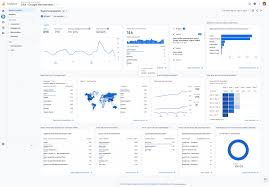
Google Analytics is a web analytics platform that collects and reports information about activity on a website or app. Its current version, Google Analytics 4 (GA4), uses an event-based measurement model. Rather than focusing only on page views, it can record a range of interactions, such as scrolling, clicking a link, watching a video or completing a purchase.
This gives businesses a broader view of the customer journey, from an initial visit through to a conversion. The insights are most useful when the analytics property is configured to reflect the organisation’s goals and website activity.
Why analytics matters in digital marketing
Marketing decisions made without reliable data can rely too heavily on assumptions. Analytics adds evidence to the process. It can help answer questions such as:
- Which channels bring visitors to the website?
- Which landing pages attract attention or encourage action?
- Where do people leave the customer journey?
- Which campaigns contribute to enquiries or sales?
- Are visitors using a mobile, tablet or desktop device?
These insights can inform practical changes, from improving a landing page to adjusting campaign budgets. Google Analytics does not make marketing decisions for a business, nor does it directly improve search rankings. Its value lies in helping teams assess performance and decide what to investigate or change.
Key GA4 reports and metrics
GA4 provides reports that cover acquisition, engagement, monetisation and user retention. The most relevant data depends on a business’s objectives, but several areas are useful for many digital marketing teams:
- Traffic acquisition: Shows how sessions arrive, such as through organic search, paid advertising, email, referrals or social media.
- Landing pages: Helps identify the pages people enter through and how they engage after arriving.
- Engagement: Includes measures such as engaged sessions and engagement rate, which can offer more context than page views alone.
- Key events: Tracks valuable actions, such as a purchase, completed form or account registration. These actions need to be defined and configured appropriately.
- Revenue and purchases: For a correctly configured online shop, ecommerce reporting can help assess product and sales performance.
Metrics should be interpreted in context. A large number of visits is not necessarily a sign of success if those visits do not support the organisation’s goals. Likewise, a change in conversion rate may reflect seasonal demand, campaign activity, website changes or tracking issues.
Using Google Analytics to improve campaigns
A useful approach begins with a clear marketing objective. For example, an organisation seeking more qualified enquiries could configure a key event for completed enquiry forms, then compare traffic sources and landing pages against that outcome.
Campaign links can be tagged with consistent UTM parameters to help distinguish activity from different emails, adverts or social posts. Once campaigns are running, marketers can review the resulting traffic and conversions, test improvements and monitor performance over time. Consistent naming is important: inconsistent campaign tags can split related activity across multiple entries and make reports harder to interpret.
Analytics can also support website optimisation. If a page receives substantial traffic but few visitors take the desired next step, the page’s content, design, loading speed and calls to action may merit review. Data can point to a potential issue, but further testing is often needed to understand its cause.
Set up measurement with care
Good reporting depends on good implementation. Before relying on the data, check that the GA4 tag is installed correctly, events are firing as expected and key events reflect genuine business outcomes. Where relevant, test ecommerce tracking and verify that internal staff visits or unwanted referral sources are not distorting reports.
Privacy also matters. Organisations operating in the UK should consider their responsibilities under applicable data protection and privacy rules, including requirements relating to cookies and similar technologies. Analytics settings, consent tools and privacy notices should be reviewed with appropriate legal or privacy guidance. Google Analytics should not be used to collect personally identifiable information, such as names or email addresses, in event parameters or page URLs.
Make data part of an ongoing process
Google Analytics is most effective when it supports a regular cycle of measurement and improvement: set an objective, configure the right tracking, review the evidence, make a change and assess the result. Reports should be tailored to the questions a team needs to answer, rather than filled with metrics that have no clear purpose.
By combining reliable tracking with clear goals and thoughtful interpretation, businesses can use Google Analytics to understand their digital marketing more fully. The result is not simply more data, but a stronger basis for deciding where to focus time, budget and effort.
7 Essential Tips for Mastering Google Analytics in Digital Marketing
- Set clear goals before tracking campaigns.
- Use GA4 events to measure meaningful actions.
- Tag campaign links with consistent UTM parameters.
- Check traffic sources to find your best channels.
- Compare conversions, not just page views.
- Build audiences for relevant remarketing.
- Review reports regularly and optimise your campaigns.
Set clear goals before tracking campaigns.
Set clear goals before tracking any digital marketing campaign. Decide what success looks like—whether that is more sales, qualified enquiries, newsletter sign-ups or visits to a key page—and configure Google Analytics to measure the relevant actions. Clear goals make reports easier to interpret, help you compare channels fairly and show whether a campaign is delivering meaningful results, rather than simply generating traffic.
Use GA4 events to measure meaningful actions.
Use GA4 events to measure the actions that matter to your business, rather than relying on page views alone. Track meaningful interactions such as completed enquiries, newsletter sign-ups, downloads or purchases, and mark your most valuable actions as key events. This helps you understand which digital marketing channels and campaigns are contributing to real results, so you can make better-informed decisions about where to focus your efforts.
Tag campaign links with consistent UTM parameters.
Tag campaign links with consistent UTM parameters to see more clearly which digital marketing activities are bringing visitors to your website. UTM tags identify details such as the campaign source, medium and name, helping Google Analytics distinguish traffic from, for example, an email newsletter, a paid advert or a social media post. Agree a clear naming convention and use it every time; inconsistent labels can split results across multiple entries and make campaign performance harder to compare.
Check traffic sources to find your best channels.
Check your traffic sources in Google Analytics to see which channels bring visitors to your website, such as organic search, paid adverts, email or social media. Compare not only how much traffic each channel generates, but also how visitors engage and whether they complete valuable actions, such as making a purchase or sending an enquiry. This helps you identify your strongest channels and make more informed decisions about where to focus your digital marketing budget and effort.
Compare conversions, not just page views.
When assessing digital marketing performance in Google Analytics, compare conversions rather than focusing only on page views. A page may attract plenty of visitors but generate few enquiries, sign-ups or sales, while a less-visited page could be much more effective at encouraging valuable actions. Set up key events that reflect your business goals, then compare conversion rates across channels, campaigns and landing pages. This helps you understand not just how many people visit, but which marketing activity is contributing to meaningful results.
Build audiences for relevant remarketing.
Use Google Analytics to build audiences based on meaningful website behaviour, such as viewing a particular product, reading a service page or starting—but not completing—a purchase. These segments can help you create more relevant remarketing campaigns, with messages tailored to what visitors have already shown an interest in. Before using audience data for advertising, make sure your tracking and consent settings comply with applicable UK privacy requirements, and avoid targeting people in ways that feel intrusive.
Review reports regularly and optimise your campaigns.
Review your Google Analytics reports regularly to understand how your digital marketing campaigns are performing. Look beyond visits alone: assess which channels bring engaged visitors and contribute to valuable actions, such as enquiries or purchases. Use these insights to refine your targeting, content and budget, then monitor the results to see whether your changes are making a difference.