Keyword Optimisation for AdWords: A Practical Guide
Google AdWords is now called Google Ads, but many advertisers still search for advice using the term “keyword optimisation AdWords”. Whatever name you use, choosing and managing keywords carefully is essential to running effective search campaigns. The right keywords can help your ads reach people who are actively looking for what you offer, while poor choices can waste budget on irrelevant clicks.
This guide explains how to research, organise and refine keywords in Google Ads, with practical tips for improving relevance and measuring performance.
What is keyword optimisation?
Keyword optimisation is the process of selecting and managing the search terms that can trigger your ads. It involves more than adding popular words to an advertising account. You need to understand what potential customers are trying to achieve, choose suitable targeting options and regularly review the searches your ads appear for.
In Google Ads, keywords are signals used to match your ads with searches. They are not always an exact copy of the words a person types. Google’s matching system considers factors such as keyword match type, the meaning of the search and other campaign settings.
Start with customer intent
Before building a keyword list, think about the people you want to reach and what they are likely to do next. A person searching for “what is loft insulation” may be looking for information, while someone searching for “loft insulation installers near me” may be ready to request a quote.
Common types of search intent include:
- Informational: The person wants to learn about a topic or solve a problem.
- Commercial research: The person is comparing products, providers or prices.
- Transactional: The person is ready to buy, book or make an enquiry.
- Local: The person is looking for a nearby service or business.
Match your keywords and ads to the intent that supports your business goals. If your campaign is designed to generate sales, prioritise searches that suggest a clear buying need, rather than relying only on broad informational terms.
How to research keywords
Begin with the products or services you offer. Write down the phrases customers might use, including common alternatives, specific product names, locations and problems they need solved. Then use keyword research tools, such as Google Ads Keyword Planner, to explore related ideas and review estimated search volume and competition.
Consider including:
- Service or product terms, such as “emergency plumber” or “running shoes”
- Specific variations, such as product types, materials or service levels
- Location phrases, where the business serves particular towns or areas
- Commercial terms, such as “buy”, “quote”, “book” or “prices”
- Brand terms, where appropriate and permitted by your advertising strategy
Search volume is only one consideration. A high-volume keyword may be too general, highly competitive or poorly matched to your offer. A more specific phrase may attract fewer searches but bring visitors who are more likely to convert.
Choose the right match types
Google Ads offers broad match, phrase match and exact match. These options affect how closely a search needs to relate to your keyword for an ad to be eligible to show. They do not guarantee that an ad will appear, as other factors—including bidding, relevance and campaign settings—also apply.
- Broad match: Can reach searches related to the keyword, including searches that do not contain the same wording. It can help discover new demand, but needs careful monitoring.
- Phrase match: Can reach searches that include the meaning of your keyword. It offers a balance between reach and control.
- Exact match: Can reach searches with the same meaning or intent as the keyword. It offers more control, but may limit reach.
Match-type behaviour can change over time, so check Google’s current guidance when setting up a campaign. Rather than assuming a keyword will only match one precise phrase, review actual search terms and use the settings that suit your budget, goals and level of risk.
Organise keywords into relevant ad groups
Group keywords according to the product, service or need they represent. For example, a home improvement company might create separate ad groups for roof repairs, roof replacement and roof inspections. This makes it easier to write ads that closely reflect the search and direct visitors to the most relevant page.
Avoid placing a large, unrelated list of keywords into a single ad group. When keywords have different meanings or customer intents, one generic advert is unlikely to speak clearly to every searcher.
Use negative keywords to reduce irrelevant traffic
Negative keywords help prevent ads from showing for searches that are not relevant to your business. A training provider, for instance, might exclude terms such as “free” or “jobs” if those searches are unlikely to generate suitable enquiries.
Review the Search terms report regularly to find queries that have triggered your ads. Add suitable negatives where they are clearly unrelated or unlikely to meet your campaign objectives. Apply exclusions thoughtfully: a negative keyword that is too broad could block valuable searches as well as unwanted ones.
Improve the connection between keywords, ads and landing pages
Keyword optimisation works best when the entire customer journey is consistent. The search, advert and landing page should all relate to the same need. If someone searches for a particular service, the ad should describe that service and the landing page should make it easy to find relevant details or take the next step.
Review the following for each important ad group:
- Does the advert clearly describe the product or service?
- Does the landing page provide the information promised in the advert?
- Is the main call to action easy to find?
- Does the page work well on mobile devices?
- Are prices, service areas and key conditions clear?
Relevance can contribute to a better user experience and may influence ad performance. However, inserting a keyword repeatedly into ad copy or a landing page is not a substitute for clear, useful content.
Measure performance beyond clicks
Clicks and impressions can help you understand reach, but they do not show whether a campaign is delivering business value. Choose measures that reflect your objectives, such as purchases, qualified leads, booked appointments or phone calls.
Useful metrics may include:
- Click-through rate (CTR): The proportion of impressions that result in clicks.
- Conversion rate: The proportion of relevant visits that complete a desired action.
- Cost per conversion: The average advertising cost for each recorded conversion.
- Return on ad spend (ROAS): The revenue attributed to advertising compared with the advertising cost.
- Search terms: The actual queries that triggered ads, which can reveal useful opportunities and irrelevant traffic.
Make sure conversion tracking is configured correctly before drawing conclusions. If tracking misses important actions or records them inaccurately, it can lead to poor decisions about keywords and budgets.
Common keyword optimisation mistakes
- Choosing keywords based on volume alone: Popular searches are not necessarily relevant or profitable.
- Using overly broad targeting without review: Broad match can expand reach, but search terms should be monitored closely.
- Ignoring negative keywords: Irrelevant searches can consume budget without supporting campaign goals.
- Combining unrelated keywords: Poorly structured ad groups make it harder to create relevant adverts.
- Changing too many things at once: Frequent, simultaneous changes can make it difficult to identify what improved or reduced performance.
- Judging keywords on clicks alone: A keyword that generates traffic may still fail to deliver valuable enquiries or sales.
A simple optimisation routine
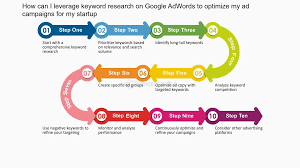
Set a regular review schedule that suits your campaign’s traffic and budget. During each review, check conversion tracking, examine search terms, add relevant negative keywords, assess performance by keyword and ad group, and confirm that landing pages remain accurate and useful.
Make changes based on evidence rather than reacting to a small number of clicks. Where possible, test one change at a time and allow enough data to collect before deciding whether it has helped.
Conclusion
Effective keyword optimisation in AdWords—now Google Ads—is about connecting the right searches with relevant adverts and useful landing pages. Start with customer intent, organise keywords logically, choose suitable match types and use negative keywords to limit irrelevant traffic. Then measure the outcomes that matter to your business and refine campaigns using reliable data.
A well-managed keyword strategy is not a one-off task. Regular, considered optimisation can help you make better use of your advertising budget and create a more relevant experience for potential customers.
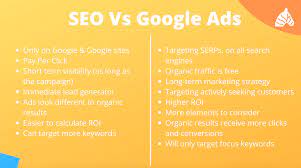
5 Key Benefits of Keyword Optimisation in Google Ads
- Reaches people actively searching for your offer.
- Improves ad relevance and click-through rates.
- Helps reduce spend on irrelevant searches.
- Supports more qualified leads and sales.
- Makes campaign performance easier to measure.
Five Drawbacks of Keyword Optimisation in Google Ads
- Can be time-consuming to manage.
- Broad keywords may attract irrelevant clicks.
- Popular keywords can be expensive.
- Search intent can be difficult to predict.
- Results depend on accurate conversion tracking.
Reaches people actively searching for your offer.
One of the key benefits of keyword optimisation in Google Ads is that it helps your adverts reach people who are actively searching for the products or services you offer. By selecting relevant keywords that reflect customers’ needs and intent, you can show your adverts at the moment potential customers are looking for a solution. This can make your advertising more relevant and increase the likelihood of attracting valuable visits, enquiries and sales.
Improves ad relevance and click-through rates.
Keyword optimisation in Google Ads helps align your keywords with your advert copy and landing page, making your ads more relevant to what people are searching for. When searchers see an advert that clearly matches their needs, they are more likely to click, which can improve your click-through rate (CTR). Higher relevance can also create a smoother experience from search to website, helping potential customers find the information or service they expect.
Helps reduce spend on irrelevant searches.
Keyword optimisation in Google Ads can help reduce spend on irrelevant searches by focusing your campaigns on terms that closely match your products, services and customers’ intentions. Using relevant keywords and adding negative keywords to exclude unsuitable queries can limit wasted clicks, making better use of your advertising budget. Regularly reviewing the Search terms report helps you spot irrelevant searches and refine your targeting over time.
Supports more qualified leads and sales.
Keyword optimisation in Google Ads helps your adverts reach people whose searches closely match your products or services. By focusing on relevant, high-intent keywords, you can attract visitors who are more likely to enquire, book or buy, rather than simply generate clicks from a broad audience. This can support a steady flow of more qualified leads and sales while making better use of your advertising budget.
Makes campaign performance easier to measure.
Keyword optimisation in Google Ads makes campaign performance easier to measure by organising related search terms into clear, focused groups. This helps you see which keywords generate clicks, enquiries or sales, and how much each result costs. With that insight, you can compare performance, adjust bids and budgets, and focus investment on the terms that best support your business goals.
Can be time-consuming to manage.
One drawback of keyword optimisation in Google Ads is that it can be time-consuming to manage. Finding suitable keywords, organising them into relevant ad groups, reviewing search terms and adding negative keywords all require regular attention. Campaigns also need ongoing monitoring as customer behaviour, competition and search trends change. Without enough time to review performance and make considered adjustments, irrelevant searches may continue to use up budget and useful opportunities could be missed.
Broad keywords may attract irrelevant clicks.
Broad keywords can help your Google Ads reach a wider audience, but they may also attract irrelevant clicks from people whose searches do not match your offer. This can use up your advertising budget without generating useful enquiries or sales. Review your search terms regularly and add suitable negative keywords to reduce unwanted traffic while keeping relevant opportunities.
Popular keywords can be expensive.
Popular keywords can be expensive because many advertisers compete to show their ads for the same searches, driving up the cost per click. This can quickly use up your budget, particularly if those clicks do not lead to sales or enquiries. Before targeting high-demand terms, weigh their likely value against the cost and consider more specific, less competitive keywords that may attract a smaller but more relevant audience.
Search intent can be difficult to predict.
A key drawback of keyword optimisation in Google Ads is that search intent can be difficult to predict. The same phrase may be used by someone researching a topic, comparing providers or ready to make a purchase, so even carefully chosen keywords can attract visitors who are not looking for the service or product being advertised. This can lead to irrelevant clicks and wasted budget, making it important to review search terms regularly and refine targeting based on actual campaign data.
Results depend on accurate conversion tracking.
One drawback of keyword optimisation in Google Ads is that its results depend on accurate conversion tracking. If purchases, enquiries or other valuable actions are recorded incorrectly—or missed altogether—performance data can give a misleading picture of which keywords are working. This may lead advertisers to reduce investment in effective keywords or continue spending on ones that are not delivering meaningful results. Regularly checking tracking set-up and testing conversion events helps ensure optimisation decisions are based on reliable information.